

The world of User Interface (UI) and User Experience (UX) is undergoing a monumental shift. For decades, our interfaces have been largely static, relying on pre-defined buttons, menus, and layouts. But the advent of Generative AI is changing everything. We’re moving beyond simple chatbots to a future where interfaces adapt, predict, and even create themselves in real-time, based on user context and intent. This isn’t just an evolution; it’s a revolution from static UI to truly adaptive interfaces.
The Dawn of Adaptive Interfaces: Beyond Buttons and Forms
Imagine an interface that doesn’t just respond to your clicks, but anticipates your needs. That’s the core promise of Generative AI in UI/UX. Instead of fixed layouts, we’re designing systems that can dynamically present the most relevant information, tools, and workflows at the exact moment they’re needed.
What is Generative UI?
Generative UI refers to user interfaces that are partially or entirely constructed by AI in response to user input, context, and goals. It’s a departure from:
- Static UI: Fixed elements, unchanging layouts.
- Reactive UI: Responds to user actions (e.g., clicking a button).
- Predictive UI: Suggests actions based on past behavior (e.g., recommending a product).
Generative UI creates new interface elements, content, or entire workflows on the fly. Think of it as a highly intelligent co-pilot for your digital journey.
Why Generative AI is the Next Frontier in UI/UX
The benefits are profound:
- Hyper-Personalization: Interfaces tailored not just to user preferences, but to their immediate task and context.
- Reduced Cognitive Load: Users don’t have to search for features; the interface brings them forward.
- Enhanced Efficiency: Streamlined workflows and faster task completion.
- Infinite Scalability: Interfaces that can adapt to entirely new use cases without a complete redesign.
The Shift: From “Drawing Pixels” to “Orchestrating Intelligence”
Designing for Generative AI isn’t about moving buttons around; it’s about defining the logic and constraints within which the AI operates. Here’s how the design process changes:
1. Defining Intent over Layout
Instead of starting with wireframes, designers now begin by defining user intents and desired outcomes.
- Old Way: “User clicks ‘Add to Cart’ button.”
- New Way: “User intends to purchase item X; AI suggests optimal checkout flow.”
2. Crafting “Prompt-Engineered” Experiences
Think of your UI elements as responses to sophisticated prompts. Designers need to understand how to guide the AI to generate appropriate and effective interface elements. This involves:
- System Prompts: Setting the overall tone, persona, and constraints for the AI.
- User Prompts: Designing how users interact with the AI to get their desired interface.
3. Designing for Fluidity and Adaptability
The interface will no longer be a rigid structure. Designers must account for:
- Dynamic Layouts: Elements may appear, disappear, or rearrange based on real-time data.
- Content Generation: AI might generate text, images, or even components within the UI.
- Feedback Loops: How does the user correct the AI if it generates something suboptimal?
Key Principles for Designing Adaptive Interfaces with Generative AI
Here are critical considerations for anyone venturing into this exciting space:
Principle 1: Contextual Awareness is King
The AI must understand who the user is, where they are, what they are doing, and why they are doing it.
- Example: A banking app that automatically surfaces “Pay Bill” option when you’re near a due date, or “Transfer Funds” when you regularly send money to a specific person.
Principle 2: Transparency and Control
Users need to understand why the interface is changing and have the ability to override AI suggestions.
- Bad UX: “The app just changed!” (confusing)
- Good UX: “Based on your meeting schedule, we’ve prioritized your calendar. [Undo/Customize]”
Principle 3: Designing for “Graceful Degradation”
What happens when the AI is wrong, or can’t generate a perfect solution? The interface must still be usable.
- Strategy: Provide clear fallback options, manual controls, and ways for users to provide feedback to improve the AI.
Principle 4: Iterative & Data-Driven Design
Generative AI-powered UIs will constantly evolve. A/B testing, user feedback, and machine learning will be crucial for continuous improvement.
- Process: Design, Deploy, Monitor AI performance, Learn, Refine AI prompts and rules.
Visualizing the Shift: Static vs. Adaptive
Let’s look at how a common scenario might evolve:
Scenario: Planning a Trip
1. Static UI (Traditional Travel App) You open the app, see fixed navigation (Flights, Hotels, Cars, Activities). You manually enter dates, destinations, and preferences. You browse through hundreds of options.
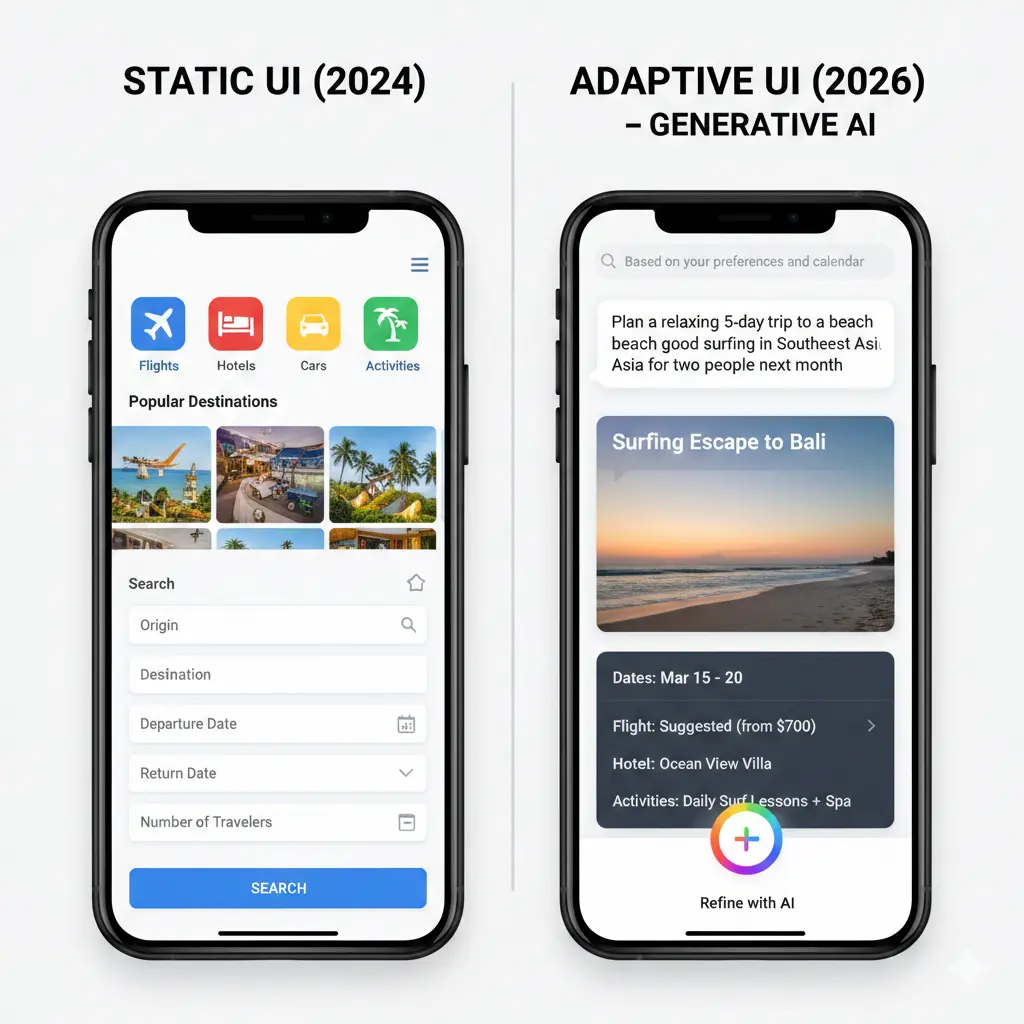
2. Adaptive UI (Generative AI-Powered Travel Assistant) You simply say or type: “Plan a relaxing 5-day trip to a beach with good surfing in Southeast Asia next month for two people.”
The AI processes this prompt, considers your past travel preferences, current calendar availability, and real-time flight/hotel data. It then generates a tailored travel plan, complete with suggested flights, accommodation, and activities, presented as a dynamic, interactive “card” or “flow.” You can then refine it with further prompts or adjust generated elements.
Conclusion: Embracing the Future of Interaction
Designing for Generative AI is less about pixels and more about purpose. It challenges us to think about user needs at a deeper, more predictive level. While the tools and techniques are evolving rapidly, the core principles of user-centric design remain paramount. The future of UI/UX is not just about making beautiful interfaces, but about creating intelligent, adaptive companions that seamlessly integrate into our lives.
As designers, our role shifts from building fixed structures to orchestrating intelligent systems. It’s an exciting, complex, and incredibly rewarding frontier.
Leave a Reply